What is Brand Center?
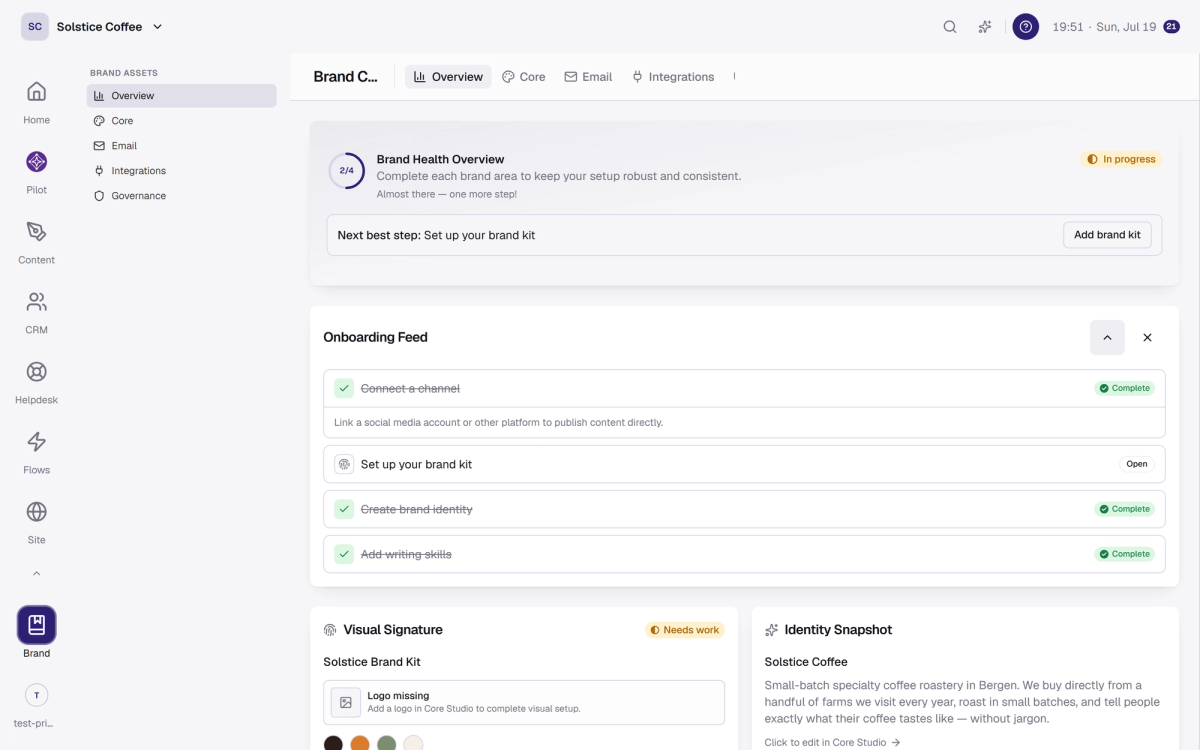
Brand Center is where your brand lives: one profile document, visual kits, writing skills, and your connected channels, read by every tool in the workspace.
On this page
Five sections
Overview: the state of your brand at a glance.
Core: the essentials, from story and voice to colors and logo.
Email: the Email Studio, your email design system.
Integrations: your connected channels.
Governance: who controls what.
Finish the setup checklist
Home tracks four setup steps: connect a channel, upload your logo, write your brand profile, and create a brand skill. Each one routes straight into the right Brand Center tab.
Everything downstream reads it
Pilot reads your profile before every draft, and your kit's colors flow into your email designs. Fill Brand Center once and the rest of the workspace stays on brand by itself.
FAQ
Brand Center questions
Why does this matter for Pilot?
Pilot reads Brand Center before it writes. The fuller your profile, the closer its drafts land to your voice.
Do I need a kit and a profile?
The profile teaches the writing, kits carry the design. Words and visuals, both worth filling.
Where do I connect channels?
The Integrations tab, right here in Brand Center. The Channels section of these docs walks through it.